When two companies merge, each one brings its own CRM. One runs Salesforce, the other runs Microsoft Dynamics, and a large share of their customers appear in both. The two systems have no customer number in common. What they share is a name and an address, typed by different people in different years: Müller & Söhne AG, Bahnhofstr. 12 in one system is Mueller Soehne, Bahnhofstrasse 12 in the other.
A person recognises these two lines as the same customer at a glance, and a database join does not. This article explains a method that sits between the two. Software proposes the links, a person decides the doubtful ones, and everything runs on a PC, including the AI model. The examples come from RecordLinker, a Windows application that implements the method, run on its synthetic demo data.
Two situations
The problem is known as record linkage, or entity resolution. It appears whenever two lists describe the same real-world entities without a common key, and two cases come up more often than any other. Both cases below concern customers, but the method is the same for vendors, materials and any other list of records, as a later section explains.
Merging two CRMs. After an acquisition, the accounts held in Salesforce and in Microsoft Dynamics have to end up in one system. Before anything is migrated, the project needs three lists: the customers that exist in both systems, those that exist only in the first and those that exist only in the second. The first list decides which accounts are merged, and therefore under which account the contacts, opportunities and contracts of both companies will sit. Each CRM also carries its own duplicates, and migrating them as they are doubles the problem.
Linking SAP to a CRM. Many companies run SAP for orders and invoices and a separate CRM for sales, and the two were filled independently. Linking them means writing the SAP customer number on each CRM account, or the reverse.
That second case is a one-time exercise, and it should be planned as one. A match describes two exports taken on the same day, and it starts to age the next morning. Two things have to follow it. An integration must carry the key from then on, so that a customer created in one system arrives in the other with its counterpart’s number. A data governance process must decide who may create and change customer records, in which system and under which rules. Matching produces the starting point and replaces neither of them.
The method
The method has five steps. The first three reduce the work to a manageable number of plausible pairs, and the last two decide what each pair is worth. The numbers in this article come from RecordLinker’s demo data, which holds 903 SAP customers and 846 CRM accounts, all synthetic.
- NormaliseRemove the differences that carry no information.903 + 846 records
- VectoriseTurn each record into a list of numbers.one vector per record
- Find candidatesKeep only the nearest records of the other system.13,545 of 763,938 pairs
- MeasureCompare each pair field by field.5 signals per pair
- ScoreCombine the signals and sort the pairs into tiers.622 auto · 235 review · 46 unmatched
1Normalise
Every value is read as text. A customer number such as 0000101698 keeps its leading zeros, and a postal code is never turned into a number. A field can be assembled from several columns, which is how SAP’s NAME1 and NAME2 become one name.
Each field then passes through a chain of normalisers that remove the differences of form and abbreviation. The original values stay on screen, and only the comparison uses the normalised text.
| As typed | As compared | What was removed |
|---|---|---|
| Müller & Söhne AG | muller sohne | Case, accents, punctuation, legal form |
| Rochat Treuhand Sàrl | rochat treuhand | Legal form |
| Holding AG | holding ag | Nothing: a name is never reduced to an empty text |
| Bahnhofstr. 12 | bahnhofstrasse 12 | Street abbreviation |
| Rte de Lausanne 5 | route de lausanne 5 | Street abbreviation |
| CH-8001 | ch8001 | Everything except letters and digits |
2Vectorise
Normalisation does not remove typing errors or translations, and equality fails on the first wrong letter. The method therefore turns each record into a vector, a list of numbers, built so that similar records receive similar vectors. The similarity of two vectors is the cosine of the angle between them, where 1 means the same direction and 0 means nothing in common.
Two engines can produce the vectors. The first cuts a text into overlapping pieces of two to four characters, called n-grams, and gives rare pieces more weight than common ones. It needs no model, and it is strong on typing errors and abbreviations, because a misspelt word still shares most of its pieces with the correct one.
The second engine is a sentence-embedding model, a neural network trained on text in more than 50 languages. It reads a text and returns 384 numbers that represent its meaning instead of its spelling. This is what local AI means here. The model is about 470 MB in size and runs on the processor of an ordinary PC. It is not a chatbot: it writes nothing, and it does not decide whether two records match.
3Find candidates
The 903 SAP customers and 846 CRM accounts of the demo make 763,938 possible pairs. Two lists of 100,000 records make ten billion. Measuring every pair in detail does not scale, so the method first selects the pairs that deserve it.
The classic answer is blocking, which compares only the records that share a key, such as the first four letters of the city. Blocking is fast and brittle. A record whose key is written differently lands in another block and never meets its counterpart.
A search by similarity avoids the problem. For each record of the first system, it takes the 15 records of the second system whose vectors are nearest, measured on name, street and city together, and it drops any candidate whose similarity is under 0.2. The demo keeps 13,545 candidate pairs, which is 1.8% of the total. Blocking remains available as an option on top of the search, for example to compare only records of the same country in very large files.
4Measure
Each candidate pair is then measured by several signals, and each signal is a number between 0 and 1. There are three kinds. A vector signal is the cosine similarity of one or several fields, using the engine chosen in step 2. A fuzzy signal compares the characters of two texts. It blends a measure that ignores word order and extra words (70%) with a plain character comparison (30%), so that Meier does not score a perfect 1 against Meier Immobilien Verwaltung. An exact signal is 1 when the two normalised values are equal and 0 otherwise.
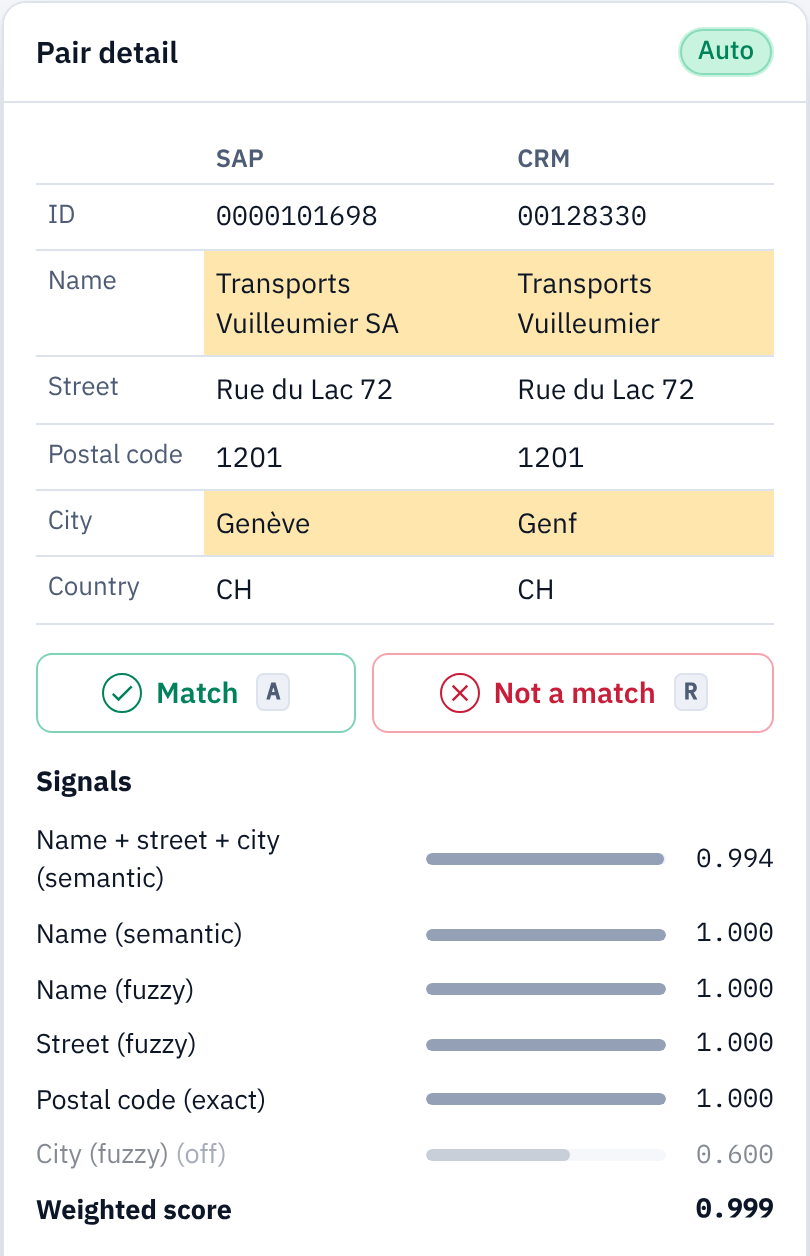
The table lists the default signals and their weights, with the values of one pair from the demo: Egli & Moser Informatik GmbH, Kirchweg 53, 5400 Baden in SAP and Egli & Moser nformatik, Kirchweg 53, Baden in the CRM, where the postal code is empty.
| Signal | Kind | Weight | Example |
|---|---|---|---|
| Name, street and city together | Vector | 0.45 | 0.945 |
| Name | Vector | 0.20 | 0.888 |
| Name | Fuzzy | 0.15 | 0.976 |
| Street | Fuzzy | 0.10 | 1.000 |
| Postal code | Exact | 0.10 | missing |
5Score
The score of a pair is the weighted average of the signals that are present. In the example, the postal code is missing, so its weight of 0.10 is left out and the four other signals share the remaining 0.90. The result is (0.45 × 0.945 + 0.20 × 0.888 + 0.15 × 0.976 + 0.10 × 1.000) / 0.90 = 0.944. The alternative policy counts a missing value as zero, which gives 0.849 for the same pair.
Two thresholds then sort the pairs into three tiers. A pair at 0.88 or above is an automatic match. A pair between 0.65 and 0.88 goes to a person for review. A record whose best pair stays under 0.65 is left unmatched, which is a result in its own right: in a merger, these are the customers that only one of the two companies had.
Each pair also records its rank among the candidates of the same record, and whether it is the best candidate seen from both sides. A record whose best match prefers another record is worth a second look, even at a high score.
The signals are stored with each pair. Changing a weight or a threshold therefore only repeats step 5: on the demo, a re-score of the 13,545 pairs takes about ten milliseconds, against about two seconds for the full run. This is what makes thresholds something to try out on the data instead of something to guess beforehand.
Learning from review
Every pair that a person confirms or rejects is a labelled example, and the weights can be replaced by a model trained on those examples. RecordLinker uses a gradient-boosting classifier for this. It needs at least ten matches and ten non-matches, and for each confirmed match it adds up to five of the record’s other candidates as non-matches, since a customer that has found its counterpart cannot also be the others.
The classifier sees the same signals as the weighted score, and it learns how they combine in this particular data, for example that an equal postal code counts for little when the names disagree. It also handles a missing value as a case of its own. Its output is calibrated into a probability between 0 and 1, which takes the place of the weighted score, and the thresholds and tiers work as before. The weights remain available, and switching between the two is a re-score.
Duplicates inside one system
Finding duplicates is the same method with one list on both sides. Each record searches for its nearest neighbours in its own file, the pair it forms with itself is dropped, and every pair is kept once. The signals, the score and the thresholds are those of matching.
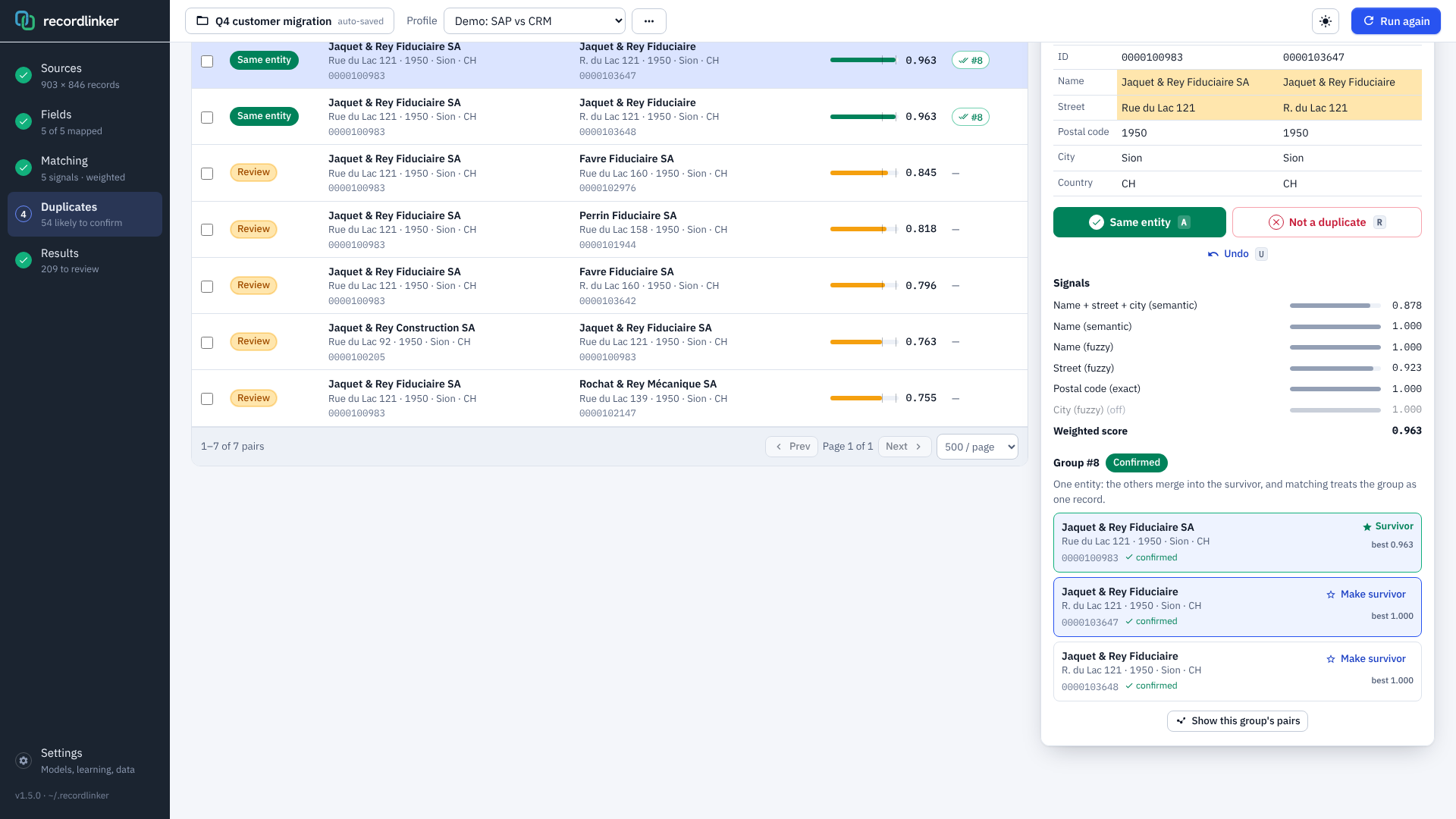
Duplicates need one more step, because they come in groups. If the first record is the same customer as the second, and the second the same as the third, the three are one customer. Building the groups is simple: every link joins two records, and the records connected by links form a group. The decision that matters is which pairs count as links.
The rule that follows is strict. A pair links two records only if it scores in the automatic tier or if a person has confirmed it. A review pair is shown and never links, and a rejected pair never links either. Before a bulk confirmation is applied, RecordLinker previews the outcome and asks again when the largest group would reach ten records, because a group of that size is usually a chain and not one customer.
Each group has a survivor, the record that remains after the merge. By default it is the record with the most filled fields, and the reviewer can choose another. Nothing is deleted by the tool. The export lists which records merge into which survivor, together with the values that only a duplicate held, such as a phone number.
Confirmed groups then count as one customer when the two systems are matched. The duplicates stay in the comparison, because the record that does not survive sometimes holds the only address that matches the other system. This gives the order of work for a CRM merger: scan each system for duplicates first, confirm the groups, and then match the two systems.
Why the model runs locally
A customer master is personal data and commercially sensitive at the same time. In a merger, the two customer lists are often among the things the two companies may not yet share freely. Sending them to an online service for matching raises a question that most projects prefer not to ask.
The method does not need one. An embedding model of this size runs on a laptop, and nothing else in the five steps is heavier than a spreadsheet calculation. RecordLinker installs as a Windows application with the model included. It reads the files from disk, keeps the decisions in a folder of the user’s profile and uploads nothing. It makes two kinds of network call: the licence check of the Microsoft Store, and the download of another model when the user asks for one in the settings.
What the demo data shows
The demo files plant 825 true pairs between the two systems, 94 customers that exist only in SAP, 59 accounts that exist only in the CRM and 32 groups of duplicates in the SAP file. Because the truth is known, the result of each engine can be checked.
| Measured on 903 × 846 records | Built-in model | N-gram engine |
|---|---|---|
| Thresholds (automatic / review) | 0.95 / 0.75 | 0.88 / 0.65 |
| Candidates per record | 30 | 15 |
| SAP customers matched automatically | 645 | 622 |
| SAP customers sent to review | 211 | 235 |
| SAP customers left unmatched | 47 | 46 |
| Automatic matches that are wrong | 1 of 645 | 2 of 622 |
| True pairs that fall under the review threshold | 11 of 825 | 5 of 825 |
| Suggested duplicate groups identical to a planted group | 28 of 32 | 25 of 32 |
The two engines do not run with the same settings, and the reason is instructive. A model that compares meaning gives a high similarity to two unrelated firms of the same trade. With the default weights, that pushed most of the one-system-only records into review and chained duplicate groups together. The demo therefore gives the model less weight (0.15 and 0.10 for the two vector signals) and more to the fuzzy and exact signals (0.30 for the name, 0.25 for the street, 0.20 for the postal code), with a wider candidate list and higher thresholds. Meaning finds the candidates, and spelling and postal codes confirm them.
Other kinds of records
The examples so far are customers, because that is where the problem appears most often. Nothing in the five steps depends on it. A record is a set of text fields, and the fields, the normalisers and the signals are chosen for each type of record. What changes from one type to the next is which fields identify the entity and which look-alikes are dangerous. RecordLinker starts from the customer settings, and fields and signals can be added or removed for other records.
| Records | Fields that identify them | What to adjust |
|---|---|---|
| Vendors | Name, address, VAT number, bank account | The customer settings apply as they are. An exact signal on the VAT number or the bank account, where both systems hold it, is stronger evidence than any name. |
| Materials and products | Description, manufacturer, manufacturer part number, unit | The part number is compared exactly, after everything except letters and digits is removed, so that AB-1234/5 and AB 12345 meet. Descriptions are short and abbreviated, and the model helps when two systems describe the same item in two languages. |
| Persons | First and last name, date of birth, email address | Names are short and common, so they carry less evidence than a company name. Exact signals on the email address or the date of birth do most of the work. |
Materials deserve the most caution. Hex bolt M8x40 and Hex bolt M8x45 differ by one character and are two different items, so a high text similarity proves little. The size, the unit and the part number belong in fields of their own with exact signals, and the thresholds have to be set on a reviewed sample of the real data. The results shown above were measured on customer records only.
Limits
- The candidate search can miss. A true match that is not among the nearest records is never measured. The 11 true pairs that the model leaves under the threshold are heavy typing errors that it does not rank among a record’s 30 nearest candidates. With n-grams, the search also works on a compressed copy of the vectors before it re-ranks the shortlist exactly.
- Similar meaning is not the same customer. Two fiduciary firms in one street are close in every sense except the one that matters. The fuzzy and exact signals, and the review tier, exist for this case.
- The middle tier needs a person. On the demo, about a quarter of the records go to review with either engine. The method makes that review fast and traceable, and it does not make it optional.
- The defaults are tuned for companies with a postal address. Other kinds of records need the fields and signals described above, and thresholds checked on their own data.
- Synthetic data flatters. The numbers above come from planted errors. Real exports contain kinds of noise that nobody planted, so the thresholds should be checked on a sample of the real files before the automatic tier is trusted.
- A match is a snapshot. The list of links is correct for the day of the export. Without the integration that carries the key and the governance process that controls who creates customers, the two systems start to drift apart again, and the exercise has to be repeated.
The demo data used throughout this article ships with RecordLinker, so every number above can be reproduced.
Comments
Have you linked two customer lists in a merger or a migration? Share which kinds of records were the hardest to match.